How to crack Windows password with John the Ripper

How to crack Windows 10, 8 and 7 password with John the Ripper:
1) Extract the hash from Windows
User Account Manager (SAM) is a database file in Windows 10/8/7 / XP that stores user passwords in an encrypted form, which in turn is located in the following directory:
C: \ Windows \ system32 \ config
The first thing we need to do is grab the password hashes from the SAM file.
Just download the free PwDump7 software and unzip it on your local PC.
Open a command prompt.
Navigate to the folder where you extracted the PwDump7 application and then enter the following command:
# PwDump7.exe> d: \ hash.txt
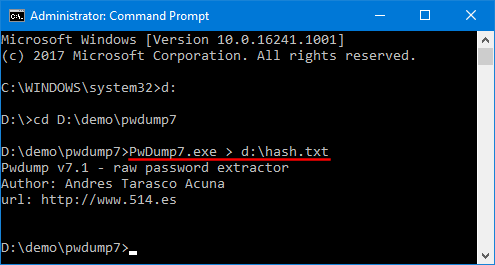
As soon as you press [Enter] PwDump7 will retrieve hashes of system passwords and save them to d: \ hash.txt file.
2) Cracking password with John the Ripper
Since you can see that the password hashes are still unreadable - we have to crack them using John the Ripper.
John the Ripper is one of the most popular password cracking tools that can run on Windows, Linux and Mac OS x.
Just download the John the Ripper Windows binaries and unzip the contents.
Open a command prompt and change the directory where you unpacked John the Ripper and then run:
# john --format = LM d: \ hash.txt
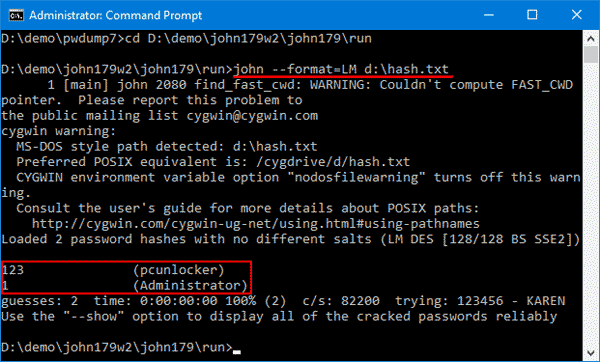
It will start cracking your Windows password. In my example, you can clearly see that John the Ripper has cracked the password within matter of seconds.
Final Words
John the Ripper is probably the world’s best known password cracking tool. But its lack of a GUI interface makes a bit more challenging to use. Don’t use it for illegal purposes.